
Every vehicle, camera and trailer.
One login.
AirIQ Fleet is the dashboard behind every AirIQ device. Location, event video, maintenance and reports, in one browser tab your whole office can use.
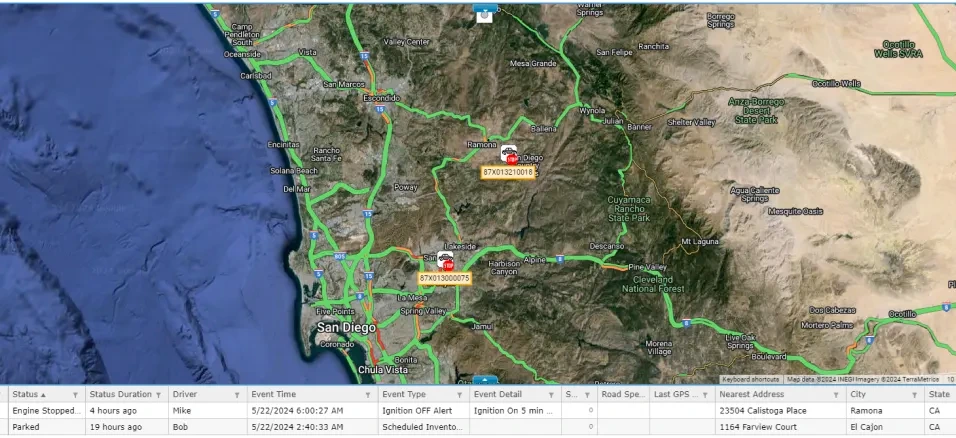
The live map and the asset grid, side by side, the way you actually work.
Six jobs, one screen.
Every AirIQ device reports into the same dashboard. This is the whole of it, before any of the detail underneath.
GPS tracking
Where everything is, and where it has been.
- Live positions for every vehicle and asset
- Replay a day, or search a radius on any date
- At least two years of history behind it
Video telematics
The clip that settles it, without pulling a card.
- Event clips upload themselves and wait for you
- Four clicks from question to downloaded file
- Held in the cloud for up to 120 days
Asset and trailer tracking
Trailers and equipment beside the trucks.
- Powered, battery and solar trackers all report in
- No second system and no second login
- Fence a yard and see what sat in it
Driver coaching
The record that backs your driver, and the coaching that follows.
- Harsh braking, acceleration, speeding and sharp turns
- Distraction raised as an event with its own clip, on cameras fitted with a cab lens
- Driver scorecard, next to the footage that explains the score
Maintenance
Service that comes due before the breakdown.
- Schedule by odometer, date or engine hours
- Connected vehicles report their own odometer
- Reminder lands before the deadline, not after
Already running other software? AirIQ Fleet exports to five formats and integrates with the tools you already have.
The map is the home screen.
You sign in and your assets are already there. Type an address or a set of coordinates into the search box and the map goes to it.
- Find a vehicle by VIN, make, model or license plate
- Draw a circle anywhere and search your history inside it, which is the fastest way to answer a customer who says nobody showed up
- Clustered icons when the yard is full, route lines when a truck is moving
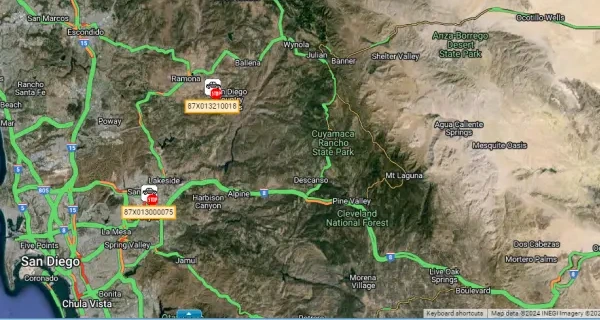
Two kinds of clip, and it matters which.
IQ-CAM stores everything on the camera, but the clips that matter push themselves to the cloud, so the evidence is waiting for you rather than sitting in a truck.
- Uploaded on their own: tamper, SOS, distracted driving, harsh braking, rapid acceleration and sharp turns
- Four clicks from a history query to a downloaded file, with no card reader involved
- Event video kept 120 days; tracking history at least two years
The report you keep rebuilding, sent to you instead.
Pick the assets, the fleet and the dates, then run it or schedule it. Standard gives you the essentials, enhanced adds make, model, voltage, ignition and full addresses.
- Daily, weekly, every two weeks, monthly or quarterly
- Emailed to a list of people with your own subject line
- Delivered as CSV, PDF, Excel, Word or MHTML
Service comes due before the breakdown does.
Set a schedule against odometer, date or engine hours, and set the reminder distance. AirIQ Fleet emails you before the deadline, not after.
Schedules that follow the truck
Set the interval and the warning distance, on one vehicle or across the whole fleet at once.
Odometers that fill themselves
A vehicle with a connected engine module reports its own odometer. The rest you calibrate once.
Service records that close the loop
Log the work and the next interval rolls forward on its own.
Draw the yard, the depot, the job site.
Right-click anywhere on the map to drop a new geofence, or open the editor for something more exact.
- Circular, rectangular, or traced corner by corner
- Search an address to place it, then name it
- Arrivals, departures and after-hours movement, logged without anyone watching
Tell it what is worth interrupting you for.
Harsh braking, rapid acceleration, speeding and sharp turns each raise an event. Group the ones that describe the same problem under a single alert your team will recognize.
- Group several events under one alert, such as reckless driving
- Set the hours an alert is allowed to reach you
- Turn a trigger off for a week without deleting it
The dispatcher does not need what the owner sees.
Every person gets their own login, and you decide what is behind it, down to the individual report and the individual action.
Invite, do not issue
People set their own password from an activation link. You never see it, and neither does anyone else.
Permissions that go deep
Narrow a login down to the individual reports and actions that person can reach.
Where your data sits
A private network protected end to end, stored in a Tier 3 data center.
The same platform, from the truck stop.
Sign in at airiqfleet.com on a phone or tablet, or use the AirIQ app on iOS and Android. Either way it is the same fleet and the same evidence, not a cut-down version.
- Full-feature app on iOS and Android
- Card view built for small screens, grid view for the desk
- In the browser: Chrome and Firefox, on any operating system
Asked about AirIQ Fleet.
Do I have to install anything?
Does it work on a phone?
How far back can I look?
How do I get a clip out of the platform?
Can I control what each person sees?
Can reports arrive without me asking?
How is my data protected?
Have a look at the real thing.
A live demo runs on real vehicles, not a slide deck. Twenty minutes, and you will know whether your dispatcher would use it.
Prefer to talk? 1-888-606-6444