- Scheduled and Daily Actions that have been set up
- Action Progress
- Route Line Preference
- Show Radius Boundaries (set up under “Actions”)
- Show Geofences (set up under “Actions”)
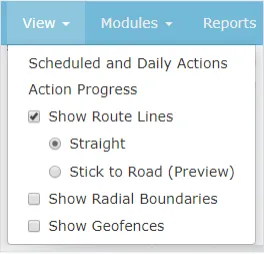

Learn How to use the view drop down menu
Learn how to access various actions
The Radius Search tool allows users to search historical data within a pre-selected radius anywhere on the map.
Search and select the asset you wish to work with: Use the same steps as outlined under “Accessing AirIQ Fleet” (step 3)
Client Care picks up the phone. If you need incident footage pulled for an insurer, say so when you call.