
Camera Settings
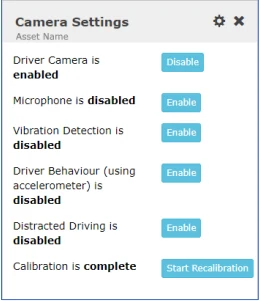
Driver Behavior setting:Enables or disables reporting of driver behavior events that use the accelerometer, including Harsh Braking, Rapid Acceleration, Sharp Turns. In certain scenarios, you may witness hyper reporting of this event so you can disable it here.
Distracted Driving setting:Enables or disables reporting of distracted driving events. Distracted Driving events use an infrared sensor next to the driver-facing lens that tracks eye movement of the driver and uses AI to determine the driver is distracted (i.e. looks away from the road, looks down, etc.) In certain scenarios, you may witness hyper reporting of this event (sometimes caused if the driver is wearing sunglasses) so you can disable it here.
Calibration setting:If a calibration is performed in non-desirable conditions (i.e. uneven ground, non-level ground, etc.), you may notice hyper-reporting of driver behavior events, vibration, or other odd behavior. If this is the case, re-calibrate your IQ-CAM here by clicking “Start Recalibration. ”Ensure that you are on flat, level ground when calibrating an IQ-CAM.